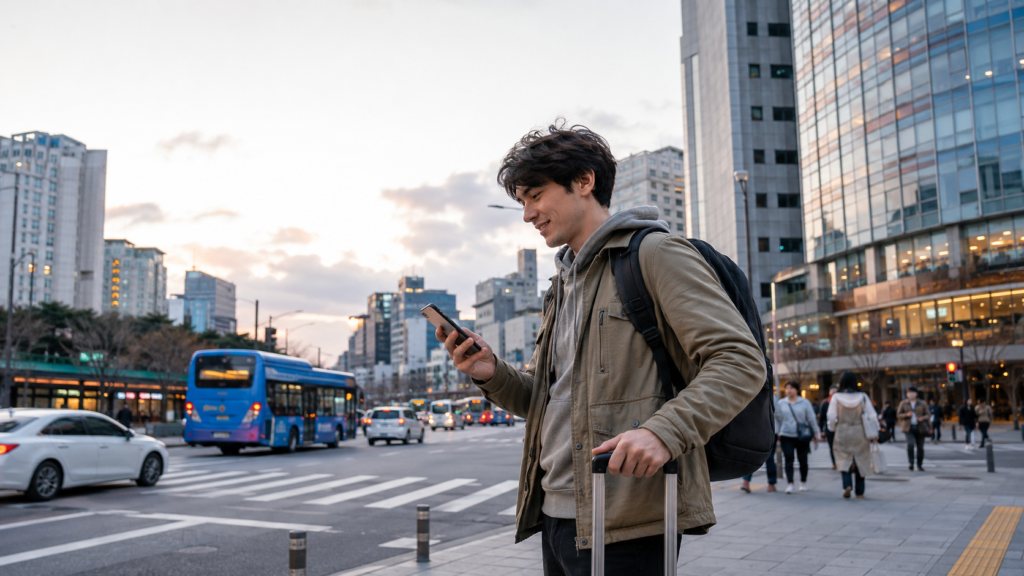
Tourist using a Korea eSIM for navigation in Seoul

Korea eSIM and SIM Card Guide for Tourists

A Korea eSIM is usually the easiest way for a tourist to get mobile data immediately after arriving in South Korea. If your phone is unlocked and supports eSIM, you can purchase a plan online, install it using a QR code and keep your original physical SIM inside the phone.

For most visitors, a direct tourist eSIM from SK Telecom, KT or LG U+ is the simplest choice. At the time of our August 2026 price check, seven-day LTE data plans from all three operators started at approximately ₩35,000, ten-day plans at ₩38,500, and 30-day plans at ₩71,500.

The prices may look almost identical, but the plans are not. Operators publish different speed policies, hotspot limits and phone-number rules. A cheaper global travel eSIM may be sufficient for maps and messaging, while a local Korean eSIM is more useful when you need a Korean number or airport support.

Research note: Explore Globe did not purchase every plan in this comparison. Information is based on the official terms published by the operators and was reviewed on August 10, 2026. Promotions, supported devices and activation requirements can change, so verify the final conditions before payment.

Korea eSIM Options at a Glance

Option Best for Korean number Purchase Main limitation
Korean carrier eSIM
Most tourists
Sometimes included
Online or airport
Compatible unlocked phone required
Global travel eSIM
Light use and multi-country trips
Usually no
Online
Often data-only
Physical tourist SIM
Older or incompatible phones
Available with selected plans
Airport or selected stores
Original SIM must be removed or stored
Pocket Wi-Fi
Families and several devices
No
Airport reservation or pickup
Separate device, battery and return
Home-network roaming
One- or two-day visits
No Korean number
Through home operator
Frequently more expensive

A data-only eSIM is enough for Naver Map, KakaoMap, Papago, messaging, email and web browsing. A voice-capable local plan becomes useful for restaurant waiting lists, reservations and businesses that contact customers using a Korean number.
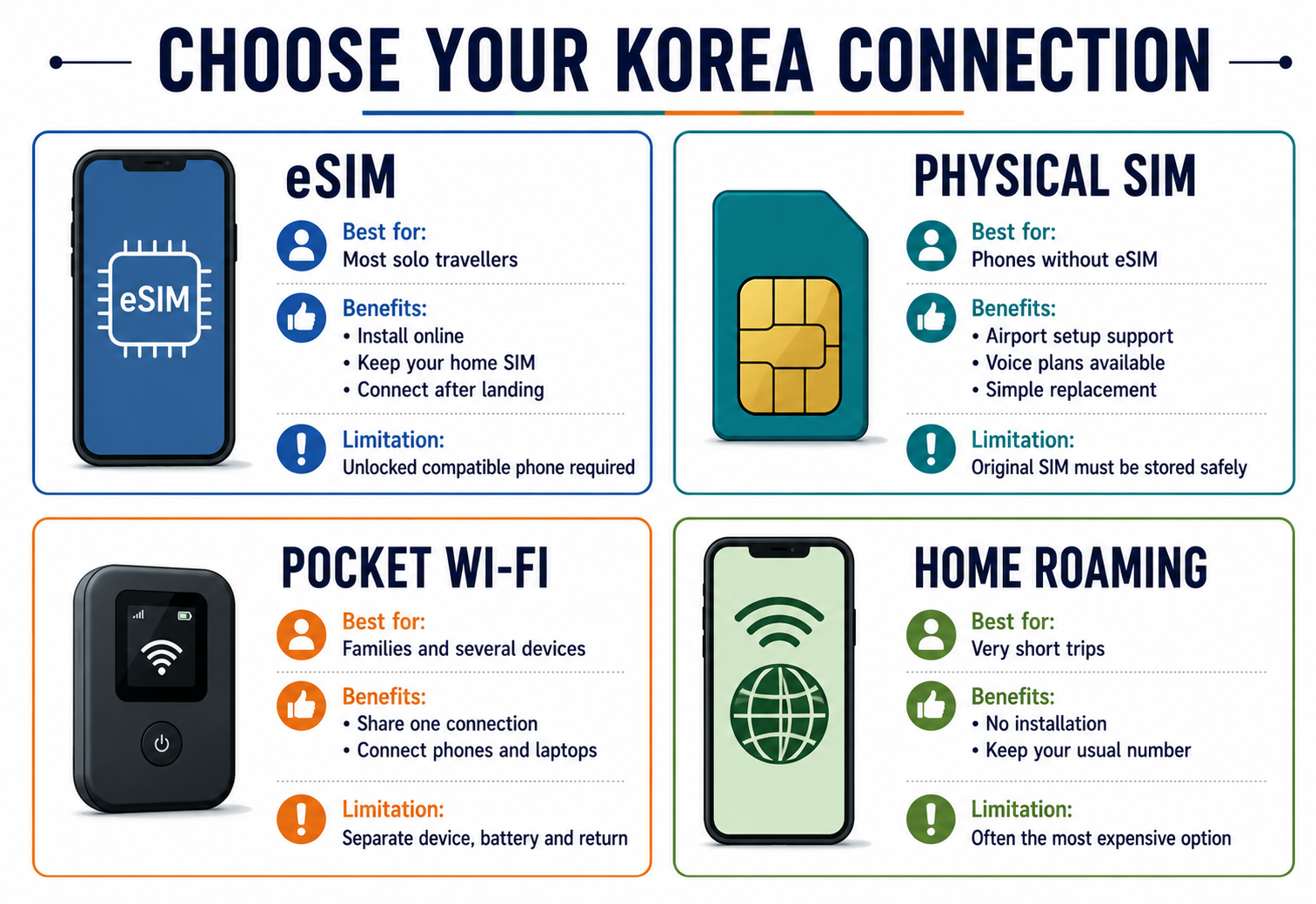
Comparison of Korea eSIM, physical SIM, pocket Wi-Fi and roaming

Current SK Telecom, KT and LG U+ eSIM Prices

The following comparison uses the operators’ direct LTE tourist data plans. It excludes temporary discount codes, reseller commissions, voice credit and bundled transport cards.

Provider 7 days 10 days 30 days Published data policy
SK Telecom LTE eSIM
₩35,000
₩38,500
₩71,500
Unlimited data at up to 100 Mbps
KT Data eSIM
₩35,000
₩38,500
₩71,500
11 GB per day, then unlimited at up to 5 Mbps
LG U+ LTE eSIM
₩35,000
₩38,500
₩71,500
Unlimited LTE without a published regular speed cap

Prices include VAT according to the operators’ booking pages. Network management may still apply during congestion or abnormal usage.
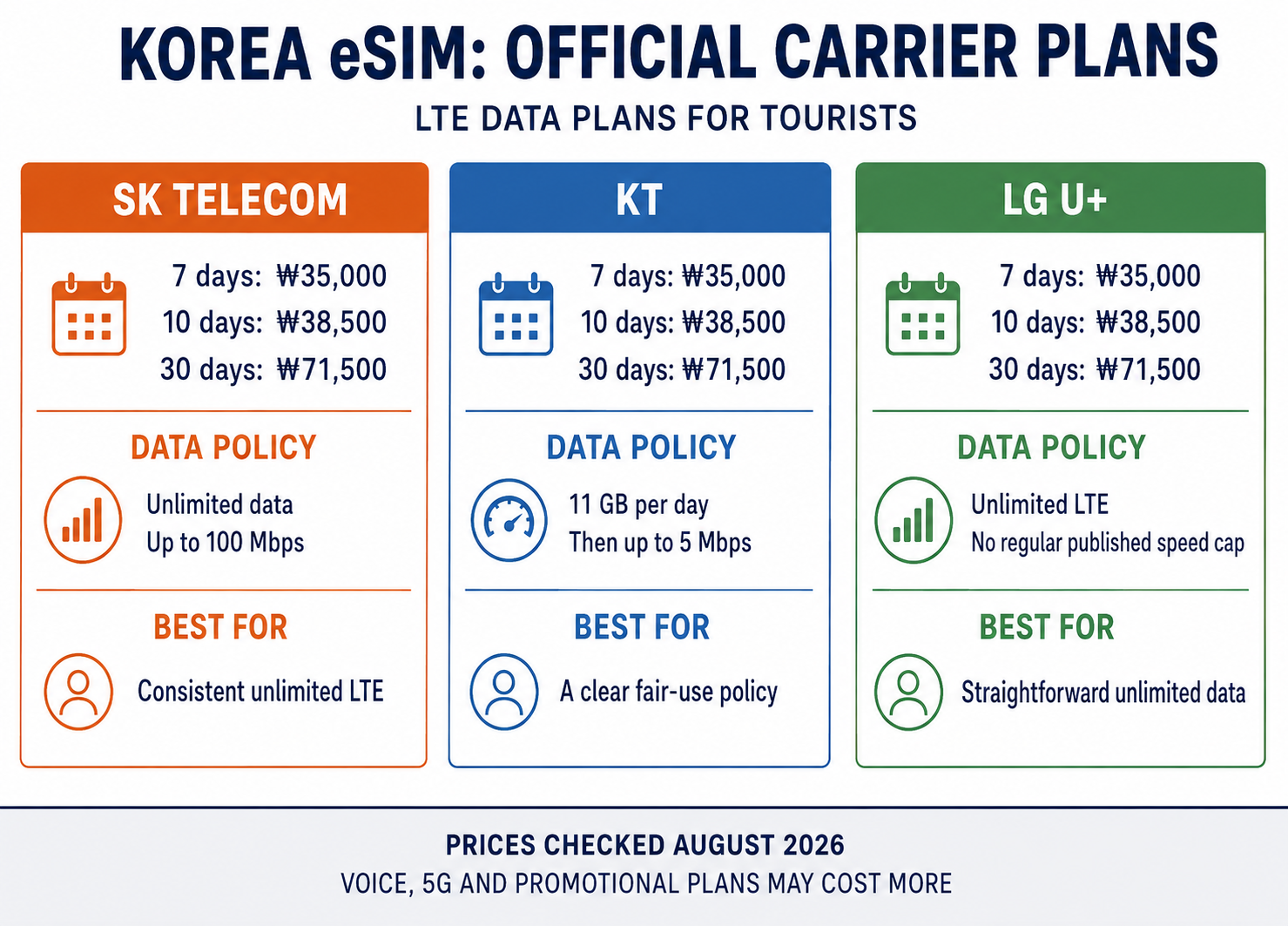
SK Telecom, KT and LG U Plus Korea eSIM plans compared

Prices by Trip Length

Duration SK Telecom LTE data KT data LG U+ LTE data
1 day
₩6,500
₩6,500
₩6,500
3 days
₩18,000
₩18,000
₩18,000
5 days
₩27,500
₩27,500
₩27,500
7 days
₩35,000
₩35,000
₩35,000
10 days
₩38,500
₩38,500
₩38,500
15 days
₩55,000
₩55,000
₩55,000
20 days
₩60,500
₩60,500
₩60,500
30 days
₩71,500
₩71,500
₩71,500

The similarity in price means you should compare the actual product rules rather than choosing solely by cost.

These connectivity expenses fit within the allowance used in our South Korea trip cost guide.

What Is the Best eSIM for South Korea?

There is no single plan that is best for every traveller. Based on the published conditions, the most suitable choice depends on how you expect to use your phone.

SK Telecom: Best for Consistent Unlimited LTE

SK Telecom’s tourist LTE eSIM provides unlimited data at a published maximum speed of 100 Mbps. Its data-only plans cover durations from one to 90 days.

The data-only version does not include usable outgoing voice or text service. Travellers who need calls and SMS must select the separate Data, Call and SMS product and complete the required passport verification.

SK Telecom also offers a 5G tourist product. At the time of checking, its longer 5G packages were sold as Data, Call and SMS plans, with speeds advertised at up to 200 Mbps. Tethering on that product was limited to 1 GB per day.

Suitable for:

  • travellers who want unlimited data without a daily capacity allowance;
  • regular navigation, social media and video use;
  • visitors who prefer a direct Korean network;
  • people who do not require extensive hotspot use.

Check current plans on the official SK Telecom roaming site.

KT: Best for a Clearly Defined Fair-Use Policy

KT publishes a transparent daily allowance: the data plan provides 11 GB each day, after which service continues at up to 5 Mbps until the daily allowance resets at midnight.

Five megabits per second is normally sufficient for maps, messaging, browsing and standard video, although actual performance depends on network conditions.

KT assigns its prepaid tourist eSIMs a 010 Korean number. Incoming calls and SMS become available on eligible plans after identity and entry verification at a KT airport roaming centre. The data-only plan does not support outgoing calls or SMS.

Suitable for:

  • travellers who want a clearly stated high-speed allowance;
  • visitors using substantial amounts of data;
  • people who may need incoming calls after airport verification;
  • travellers who prefer to know the reduced speed in advance.

See the official KT tourist eSIM page.

LG U+: Best for Straightforward Unlimited LTE

LG U+ advertises its LTE tourist data eSIM as unlimited without a regular speed limit or throttling threshold. The company notes that speeds can still be managed during excessive network congestion.

The plan activates on first data use rather than simply when the QR code is scanned. LG U+ also offers Data + Voice and CHECK iN SEOUL products with a Korean 010 number, optional call credit and airport services.

Its official conditions state that voice-enabled tourist products can support SMS verification for some restaurant and taxi reservation services. They do not provide the personal identity verification required for banking or government services.

Suitable for:

  • travellers wanting a simple unlimited LTE plan;
  • visitors who need hotspot support;
  • people considering a voice-capable Korean tourist number;
  • travellers who want assistance at an airport counter.

Check current prices and device restrictions on the official LG U+ eSIM page.

Direct Korean eSIM or Global Travel eSIM?

International eSIM services can be cheaper when you need only a limited amount of data. They are also convenient for trips combining South Korea with Japan, Singapore or another country.

However, verify more than the displayed price.

Feature Direct Korean carrier Global travel eSIM
Network
SKT, KT or LG U+ directly
Roams on a partner network
Korean phone number
Available on selected products
Usually unavailable
Voice and SMS
Available on selected products
Usually data-only
Airport support
Available
Usually online only
Low-data packages
Limited
Common
Unlimited plans
Common
Meaning varies by provider
Multi-country use
Usually Korea only
Frequently available
Identity or entry verification
Required for some phone functions
Usually not applicable

Before buying a global product, check:

  • which Korean network it uses;
  • whether data roaming must be enabled;
  • the amount of full-speed data;
  • the speed after the allowance is used;
  • whether tethering is allowed;
  • when validity begins;
  • whether the eSIM can be reinstalled;
  • whether the advertised unlimited plan has a daily fair-use limit.

A global eSIM is generally better for a light user who needs only a few gigabytes. A direct Korean plan is easier to understand when unlimited data, local support or a Korean number matters.

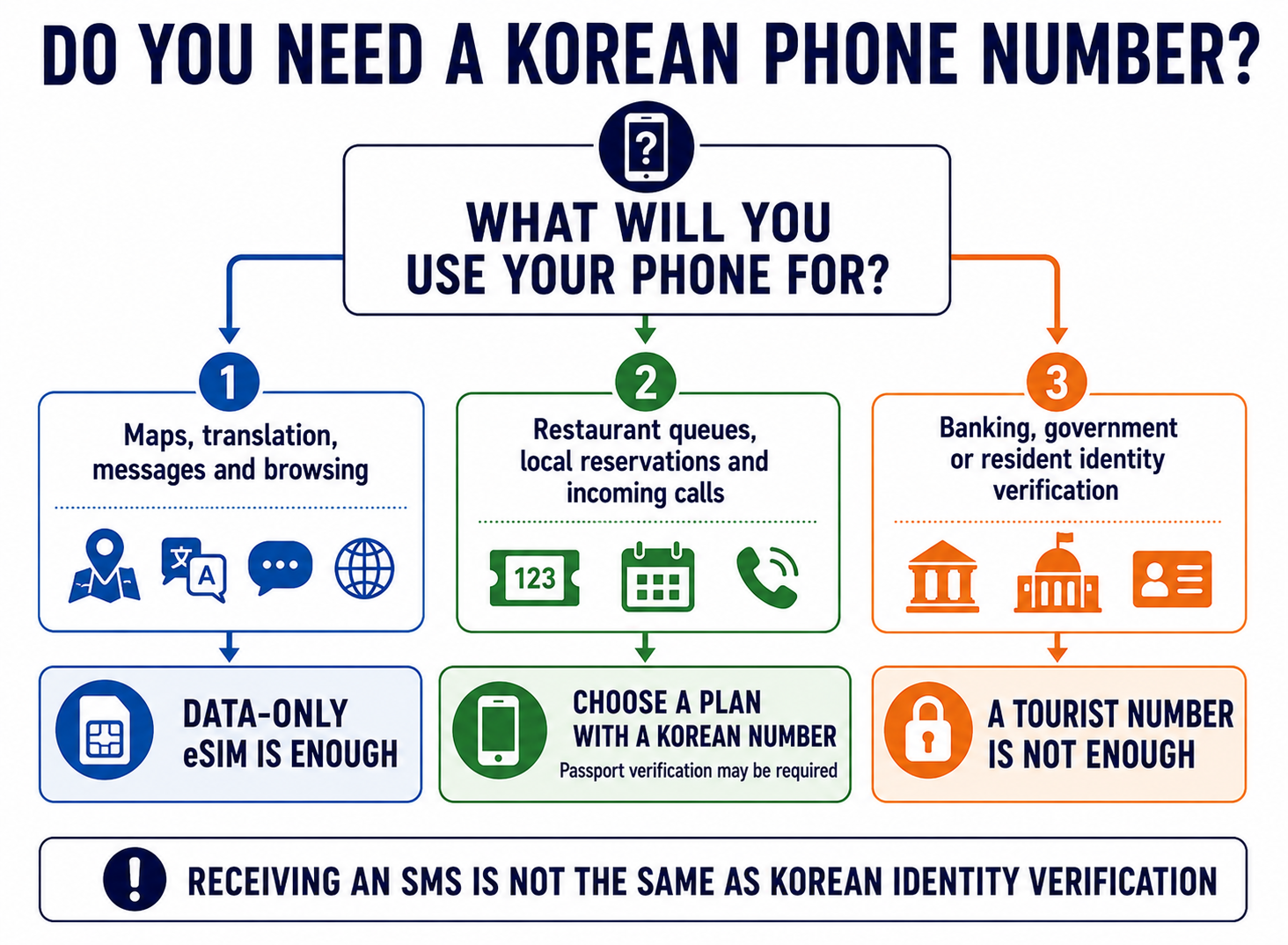
Do Tourists Need a Korean Phone Number?

Most short-term visitors do not need one.

The following normally require only an internet connection:

  • Naver Map;
  • KakaoMap;
  • Google Maps;
  • Papago;
  • WhatsApp;
  • Messenger;
  • email;
  • mobile hotel and airline applications;
  • browsing and translation.

A Korean number can nevertheless help with:

  • restaurant waiting systems;
  • local reservation confirmations;
  • receiving calls from accommodation providers;
  • taxi or activity operators;
  • luggage-delivery communication;
  • selected food-delivery services.

Decision guide explaining whether tourists need a Korean phone number

A Korean Number Does Not Guarantee Identity Verification

This distinction is important.

A temporary tourist SIM may provide a 010 number and receive verification texts, but it generally does not provide the resident identity authentication used by:

  • Korean banks;
  • government websites;
  • long-term mobile contracts;
  • financial services;
  • services requiring a resident registration number or residence card.

LG U+ explicitly distinguishes SMS verification for some restaurant and taxi services from personal verification for banking and government services.

Therefore, do not buy an expensive voice plan solely because a website says it includes a Korean number. First determine whether you need ordinary SMS reception or actual identity authentication.

Data-Only Versus Data and Voice eSIM

Feature Data-only eSIM Data + Voice eSIM
Mobile internet
Yes
Yes
Internet calls
Yes
Yes
Incoming Korean calls
Usually no or restricted
Usually yes after verification
Outgoing calls
No
Yes after credit or included minutes
SMS
Usually unavailable or restricted
Available according to plan
Airport passport check
Often unnecessary for data
Commonly required
Price
Lower
Higher

Internet calling through WhatsApp, KakaoTalk, FaceTime or Messenger does not require traditional voice minutes. Both participants only need a working data connection.

If a hotel or tour operator needs to call you on a Korean number, choose a voice-capable plan and complete any passport verification before leaving the airport.

Physical Korea Tourist SIM Card

A physical Korea tourist SIM remains useful when:

  • the phone does not support eSIM;
  • the device is unlocked but has only a physical SIM slot;
  • you want airport staff to complete the setup;
  • you specifically need a voice-capable product;
  • you do not need to keep your home SIM active.

Physical tourist SIMs are sold by SK Telecom, KT and LG U+ at major airport roaming centres. Selected convenience stores and resellers also sell prepaid products, but activation and English-language support can vary.

Before replacing your home SIM:

  1. Switch off the phone.
  2. Store the original SIM in a secure holder.
  3. Do not attach it loosely to the phone case.
  4. Keep access to any banking applications that depend on the original number.
  5. Confirm how you will receive important verification codes.

Travellers using a physical SIM should consider whether losing access to their original number will affect banking, email recovery or two-factor authentication.

Where to Buy a SIM or eSIM

Before Departure

Buying online allows you to:

  • check phone compatibility calmly;
  • read the fair-use policy;
  • receive and save the QR code;
  • avoid making the decision after a long flight;
  • connect shortly after landing.

Do not wait until departure day to discover that your phone is locked or does not support the selected carrier’s eSIM.

Incheon Airport

SK Telecom, KT and LG U+ operate roaming centres at Incheon Airport. Locations and opening hours differ between Terminal 1 and Terminal 2 and can change.

Airport counters are most useful when:

  • you need passport verification;
  • you require calls and SMS;
  • installation has failed;
  • you are purchasing a physical SIM;
  • you want the connection tested before leaving.

Check the current operator, terminal and opening time in the official Incheon Airport facilities directory.

Gimpo and Gimhae Airports

Selected operators also provide pickup or verification at Gimpo Airport in Seoul and Gimhae Airport near Busan. Availability depends on the product, so select the correct airport during booking.

Convenience Stores

Some airport and city convenience stores sell prepaid SIM cards. This can be useful for compatible data products, but do not assume that every store employee can:

  • verify a passport;
  • activate voice service;
  • troubleshoot an eSIM;
  • explain the fair-use policy;
  • confirm compatibility.

For a first visit, an official operator counter is safer when setup assistance matters.

Check Your Phone Before Buying

1. Confirm That the Phone Is Unlocked

A phone can support eSIM but still be locked to the operator that sold it.

Contact your home carrier or check the device settings. Paying off a device does not always unlock it automatically.

2. Check for an EID

Dial:

*#06#

If the device displays an EID, it contains eSIM hardware. This does not guarantee compatibility with every Korean operator, so check the provider’s device list as well.

3. Check the Exact Model and Purchase Country

Phones with the same commercial name may have different eSIM support depending on:

  • model number;
  • country of purchase;
  • carrier firmware;
  • regional restrictions.

Do not rely only on statements such as “iPhone 14 supports eSIM” or “this Samsung model has dual SIM.”

4. Check Dual-SIM Support

If you want to keep your home number active, verify that the phone can use:

Home SIM + Korea eSIM

simultaneously.

5. Read the Refund and Reinstallation Rules

Direct carrier eSIMs are commonly non-refundable after purchase or installation. Deleting an installed profile may permanently destroy it, and a replacement QR code may not be issued.

How to Install a Korea eSIM

The menu names vary by manufacturer and software version.
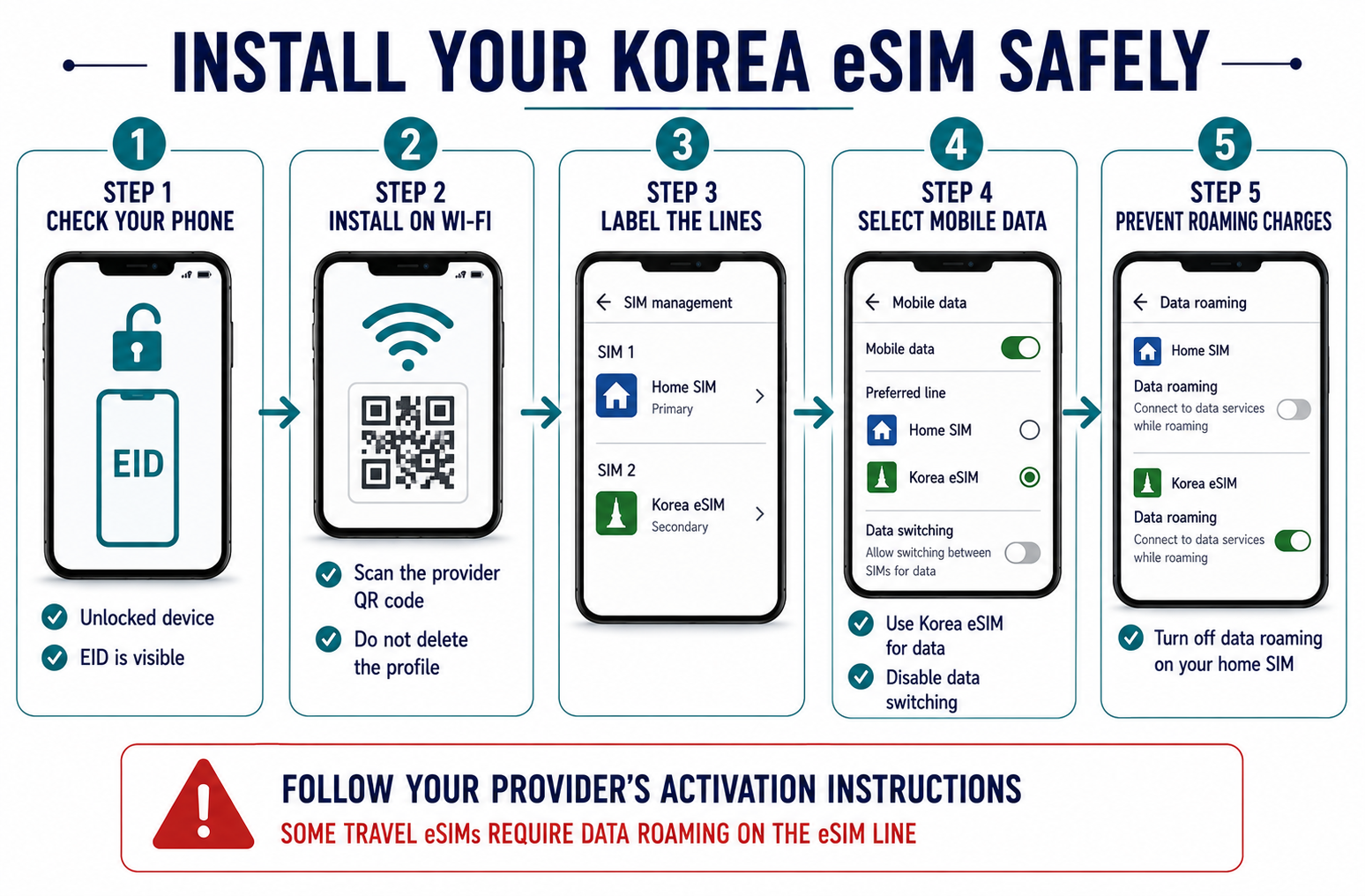
Korea eSIM installation and roaming safety checklist

iPhone

A typical path is:

Settings
→ Cellular or Mobile Data
→ Add eSIM
→ Use QR Code

After installation:

  1. Label the new line Korea.
  2. Keep your home number selected for calls only if necessary.
  3. Select the Korea eSIM for cellular data.
  4. Disable cellular data switching.
  5. Turn off data roaming for your home line.
  6. Follow the eSIM provider’s instructions about roaming on the Korea line.

Android

A common Samsung path is:

Settings
→ Connections
→ SIM Manager
→ Add eSIM
→ Scan QR Code

After installation:

  1. Name the profile Korea.
  2. Choose it as the preferred mobile-data SIM.
  3. Disable automatic data switching.
  4. Turn off roaming for your home SIM.
  5. Restart the phone if the network does not connect.

Install or Activate?

These are not always the same event.

Some plans can be installed before departure but start only after the first connection in South Korea. Others begin at installation or after manual activation.

Before scanning the QR code, check:

  • installation deadline;
  • activation deadline;
  • when the validity period starts;
  • whether the QR code can be scanned more than once;
  • whether an internet connection is needed for installation.

Keep the QR code available on another screen or printed page. A phone cannot easily scan a QR code displayed on its own screen unless the operating system supports importing it from an image.

Avoid Charges from Your Home Operator

Installing an eSIM does not automatically disable your original line.

Use this checklist:

  • Korea eSIM selected for mobile data
  • Data roaming disabled on the home SIM
  • Cellular data switching disabled
  • Home carrier travel pass checked
  • Voicemail roaming charges checked
  • Wi-Fi calling conditions checked

Keeping the home SIM active may be useful for receiving banking texts. Incoming SMS is free with many operators, but this is not universal. Calls, voicemail and outgoing messages may still create roaming charges.

How Much Mobile Data Do You Need?

Traveller type Suggested allowance for one week
Maps, messages and occasional searches
1–3 GB
Regular navigation and social media
5–10 GB
Frequent photos, video and uploads
15–30 GB
Streaming or hotspot use
High-capacity or unlimited plan
Remote work
Unlimited plan with verified tethering policy

Offline maps reduce usage, but navigation is rarely the largest expense. Video, automatic photo backup, software updates and hotspot connections consume much more data.

Before travelling:

  • disable automatic application updates;
  • pause cloud photo backup;
  • download offline entertainment on Wi-Fi;
  • turn off video autoplay;
  • restrict background data for unnecessary applications.

eSIM, Pocket Wi-Fi or Roaming?

Choose an eSIM When:

  • your phone supports it;
  • you are travelling alone;
  • you want to keep your original SIM;
  • you need internet immediately;
  • you do not want to carry another device.

Choose Pocket Wi-Fi When:

  • several people will remain together;
  • you need to connect phones, tablets and laptops;
  • the rental includes enough high-speed data;
  • someone can carry and recharge the router.

Pocket Wi-Fi becomes inconvenient when group members separate. It must also be collected, charged and returned.

Choose Home Roaming When:

  • the trip lasts only one or two days;
  • your existing plan includes South Korea;
  • receiving calls on your home number is essential;
  • the total price is competitive with a local plan.

Compare the full trip cost. A seemingly manageable daily roaming charge can become expensive over ten or 14 days.

Troubleshooting a Korea eSIM

The eSIM Is Installed but Has No Internet

Check:

  1. Is the Korea eSIM enabled?
  2. Is it selected for mobile data?
  3. Is data roaming enabled if required by that provider?
  4. Is the home SIM still selected for data?
  5. Has the plan reached its activation date?
  6. Does the APN match the provider’s instructions?
  7. Has the phone been restarted?

The Phone Shows a Number but Cannot Receive Verification Codes

A number visible in the settings does not prove that voice or SMS service is activated. Data-only products may assign a technical number without supporting normal verification messages.

Check whether:

  • the plan includes incoming SMS;
  • passport verification is complete;
  • entry verification was completed at the airport;
  • the service supports ordinary SMS but not personal identity verification.

Hotspot Does Not Work

Verify the tethering policy. Some unlimited plans place a separate limit on hotspot traffic.

Restart the phone, reconnect the other device and check whether the correct APN was automatically installed.

The QR Code No Longer Works

Most eSIM QR codes can be installed only once. If the profile has been deleted, contact the provider before buying another plan. Do not repeatedly scan the code on several devices.

Practical Recommendation by Traveller

Traveller Recommended option
First-time visitor for 7–10 days
Direct SKT, KT or LG U+ LTE eSIM
Light user needing only maps and messages
Capped global travel eSIM
Traveller requiring a Korean number
Voice-capable Korean carrier eSIM
Older phone without eSIM
Physical airport SIM
Family staying together
Pocket Wi-Fi or separate eSIMs
Remote worker
Unlimited plan with a clear hotspot policy
Korea and Japan combined trip
Regional travel eSIM or separate local plans
Stay longer than 90 days
Short-term eSIM first, then a resident plan when eligible

Frequently Asked Questions

What is the best eSIM for South Korea?

For most tourists, a direct LTE eSIM from SK Telecom, KT or LG U+ provides the clearest combination of pricing, local support and data. The best operator depends on speed policy, phone-number needs and tethering.

How much does a Korea eSIM cost?

At the August 2026 price check, direct LTE data plans generally cost ₩18,000 for three days, ₩35,000 for seven days, ₩38,500 for ten days and ₩71,500 for 30 days.

Can tourists buy a SIM card at Incheon Airport?

Yes. SK Telecom, KT and LG U+ operate roaming centres at Incheon Airport. Check the current terminal location and opening hours before arrival.

Does a Korea eSIM include a phone number?

Some direct Korean carrier products include or assign a Korean number. Global travel eSIMs are usually data-only. A visible number does not necessarily include calls, SMS or identity verification.

Do I need a Korean number for KakaoMap or Naver Map?

No. Navigation applications require mobile data but not a Korean number for ordinary map use.

Can I install the eSIM before travelling?

Often yes, but check when the validity period begins. Some plans activate on first data use in South Korea, while other products may start earlier.

Will installing an eSIM change my WhatsApp number?

No. WhatsApp normally remains connected to the number used when the account was registered. Do not choose to change the WhatsApp number unless you specifically want to migrate the account.

Does a Korea eSIM work on Jeju Island?

Direct Korean carrier plans provide nationwide service, including Jeju. Actual signal strength still varies by location, terrain and network conditions.

Is unlimited data really unlimited?

The definition varies. A plan may have no volume cap but limit maximum speed, reduce speed after a daily allowance or restrict hotspot use. Always read the fair-use policy.

Can I use a tourist number for Korean banking verification?

Generally no. Tourist voice and SMS service may work for restaurant or taxi confirmations, but it does not normally provide the resident identity verification required for banks and government services.

Final Checklist

Before purchasing a Korea eSIM, confirm:

  • Phone is unlocked
  • Exact device model is supported
  • EID is visible
  • Plan duration matches the trip
  • Activation timing is understood
  • Full-speed allowance is clear
  • Hotspot policy is acceptable
  • Korean number is included if needed
  • Passport verification requirements are understood
  • Home-SIM roaming is disabled
  • QR code and support details are saved

For a typical seven- or ten-day trip, a direct Korean LTE eSIM costing approximately ₩35,000–₩38,500 is the simplest all-round option. Light users can spend less with a capped global eSIM, while travellers who need calls, SMS or a Korean number should choose a voice-capable local product and complete the required airport verification.

Leave a Comment

Your email address will not be published. Required fields are marked *